
Mac mini M6 32GB If you want 32GB for a 27B model, check the memory headroom before the new chip.
If you plan to run a Qwen 27B-class Q4 model while keeping a browser or document app open, the 32GB configuration belongs on the shortlist. It has the same 170GB/s memory bandwidth as the 24GB M6, so the reason to buy 8GB more is the headroom left after loading the model. It launched on September 22, 2026, and can now be compared using current configurations and prices.
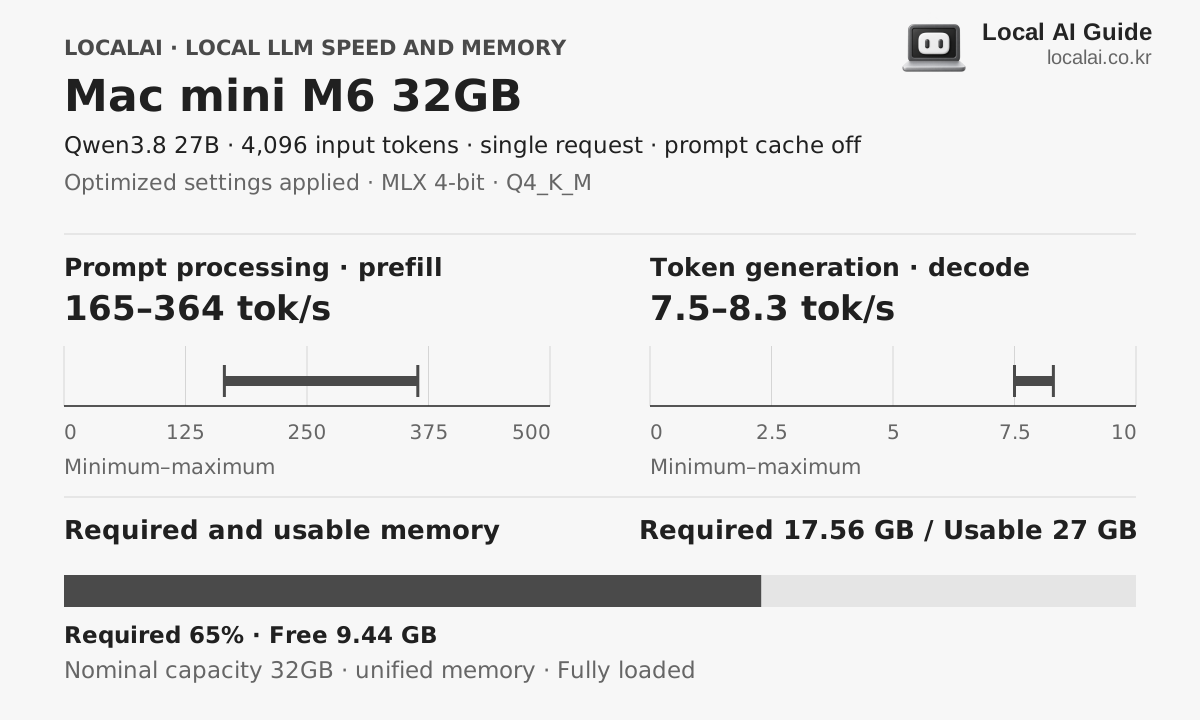
Speed and memory for the same model
Hardware core specifications
- Available memory
- 27GB
- Memory bandwidth
- 170GB/s
- Estimated sustained LLM load
- About 55W
- Korean price range (KRW)
- 235 × KRW 10,000–320 × KRW 10,000
Who it fits
- Run a 27B Q4 model alongside work apps
- Start with short prompts and extend context
- A compact Mac without building a PC
Skip it if
If you only plan to use 12B-class models with short inputs, you do not need to start with 32GB. Check whether the model and input cache fit comfortably in 24GB. More unified memory will not add compatibility for CUDA-only apps or nodes. Check both SSD capacity and the final price of the current configuration.
Recommended format for each device 4K input
The model you will experience with this equipment
K2 Horizon 0.9B
Required 1.03GB · spare time
MLX 4-bit
Decode
224.5 ~ 250.2 tok/s
First token
1.1 to 2.7 seconds
Qwen3.8 27B
recommendedRequired 17.56GB · spare time
MLX 4-bit
Decode
7.5 ~ 8.3 tok/s
First token
11.4 ~ 25.0 s
K2 Horizon MoVA 36B-A4B
Required 21.94GB · titration
MLX 4-bit
Decode
50.4 ~ 56.2 tok/s
First token
7.2 to 17.5 seconds
Actual speed varies with runtime version, cooling, context length and quantization file.
purchase judgment
What tasks is it suitable for?
27B conversation
ConditionalStart with Q4 and a 4K input. Even when the model fits, long conversations or several open apps reduce the room available for the input cache. Perceived speed varies with the runtime and quantization.
Documents and coding
SuitableCompare the length of the sections you actually need instead of sending an entire document by default. Long inputs affect the wait for the first token; long answers affect generation time.
Image and CUDA workflows
ConditionalYou can use models and nodes supported on Mac, but CUDA-only extensions will not transfer unchanged. Check your existing workflow first.
- The first thing to get stuck
- The model cannot use all 32GB: macOS, open apps, and prompt cache share the unified memory. Apple's specifications give the M6 24GB and 32GB the same 170GB/s bandwidth, so when a workload fits on both, the capacity difference alone will not increase generation speed proportionally.
- Configuration to check
- M6 · 12-core GPU · 32GB unified memory · 1TB or larger SSD recommended (check available configurations)
- Criteria for spending more money
- If you already own an M4 32GB, memory capacity alone is not a reason to replace it with an M6. Compare prompt processing and long-answer generation using the same model, quantization, and input length. For a new purchase, first check whether the M6 24GB can do the job; pay for 32GB only if a 27B model plus your other apps leave too little room. If waiting time is the main problem, the M4 Pro 48GB is also worth comparing.
On sales pages, look at memory before chips.
The model and speed assumptions above change if the product is not the 32GB configuration.
Frequently asked questions
- What LLM can be run on the Mac mini M6 32GB?
- K2 Horizon 0.9B, Qwen3.8 27B, K2 Horizon MoVA 36B-A4B and others with a 4K input and the recommended format. Required memory varies by model and context length.
- What is the local LLM power of the Mac mini M6 32GB?
- Sustained load is about 55 W, with an actual range of 35–80 W.
- Are the displayed token speeds ground truth?
- This is a range aligned to collected benchmark measurements under the same conditions. Combinations without a matching measurement are estimated from the nearest result and vary with runtime, cooling, quantization file and context length.
Equipment to compare together
Consider less memory for mainly 12B models
Mac mini M6 24GB
M6 24GB configuration with 170GB/s memory bandwidth. You can compare the 12B class with some 27B Q4 models.
Compare with the previous 32GB generation
Mac mini M4 32GB
Consider this configuration if you want to run 27B Q4 without building a new PC. Moving up makes sense if 24GB was running out of memory. If the model and cache already fit, however, choosing 32GB does not make the chip itself faster.
If waiting time matters more
Mac mini M4 Pro 48GB
When you repeatedly read documents and edit code with a 27B model, each wait matters as well as capacity. This page uses the 20-core GPU, 48GB configuration. Distinguish it from less expensive listings with a 16-core GPU.