
Mac Studio M3 Ultra 512GB Decide what needs 512GB before comparing the price of this Mac.
Consider this machine when the combination of model, quantization, and prompt cache will not fit on a 256GB configuration but must run on one computer. Before buying for the 512GB label, add up the actual model files and memory used by other apps. If you only want to run one Qwen3.8-Flash-Next Q4 model, first compare smaller-memory configurations under the same conditions.
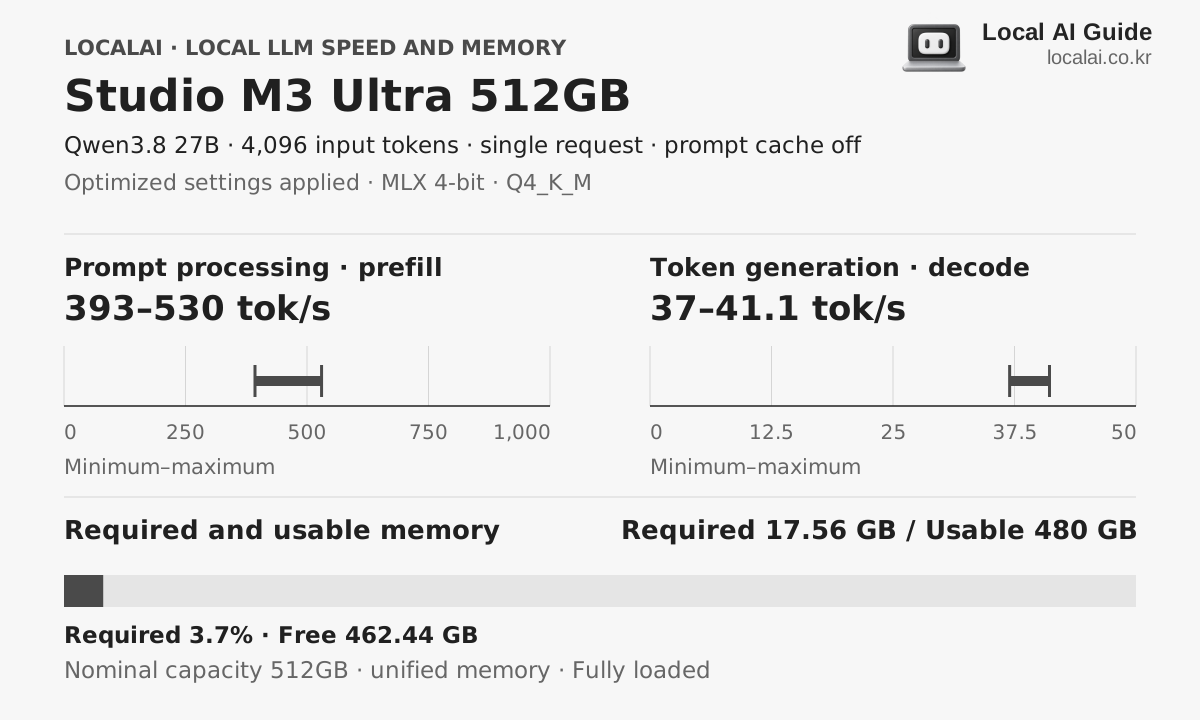
Speed and memory for the same model
Hardware core specifications
- Available memory
- 480GB
- Memory bandwidth
- 819GB/s
- Estimated sustained LLM load
- About 230W
- Korean price range (KRW)
- Check current order price
Who it fits
- Model and cache combinations that do not fit in 256GB
- Keep several large models loaded on one computer
- Large-memory workloads using macOS and MLX
Skip it if
If your serving tools require CUDA, 512GB of unified memory will not solve the compatibility problem. A listed price for an Apple Certified Refurbished 512GB unit does not mean it is in stock. Check availability, SSD capacity, warranty, and the 80-core GPU configuration before ordering.
Recommended format for each device 4K input
The model you will experience with this equipment
K2 Horizon 0.9B
Required 1.03GB · spare time
MLX 4-bit
Decode
1112.6 ~ 1236.2 tok/s
First token
0.47 to 0.63 seconds
Qwen3.8-Flash-Next
recommendedRequired 107.13GB · spare time
MLX 4-bit
Decode
50 ~ 70.3 tok/s
First token
3.3 to 4.5 seconds
DeepSeek-V4.1-Flash
Required 435.16GB · titration
oMLX 0.7.0.dev2 · Lightning MTP on · Engram resident in RAM
Decode
23.1 ~ 41.0 tok/s
First token
7.1 to 12.6 seconds
Actual speed varies with runtime version, cooling, context length and quantization file.
purchase judgment
What tasks is it suitable for?
Large higher-precision models
ConditionalCheck the exact quantized model file, KV cache, and runtime support rather than the model name or parameter count alone. A file that fits in memory is still unusable without a working execution path.
Keeping several models loaded
SuitableThe capacity can keep several models loaded, but being able to hold more models does not by itself increase token-generation speed for a single request.
Ordinary Q4 chat workloads
Not recommendedIf you plan to run just one 27B or Qwen3.8-Flash-Next Q4 model, do not start with 512GB. Compare memory headroom and speed on a smaller machine at the context length you actually need.
- The first thing to get stuck
- The 512GB is total unified memory shared by macOS, the model, and the prompt cache. This site's 480GB usable-memory figure is a planning allowance, not GPU-only memory guaranteed by Apple. If a model already fits comfortably on a smaller configuration, adding capacity alone will not increase generation speed proportionally.
- Configuration to check
- M3 Ultra · 32-core CPU · 80-core GPU · 512GB unified memory · 2TB or larger SSD · Verify current stock
- Criteria for spending more money
- If one Qwen3.8-Flash-Next Q4 model is your goal, first check memory headroom and waiting time on a 128GB or 256GB machine. Paying for 512GB makes sense only when the actual model files and cache will not fit in a 256GB configuration. A displayed price for an out-of-stock refurbished M3 Ultra is not a price you can buy at. A new M5 Ultra 512GB is ₩38.05 million with a 1TB SSD. Compare that total with the refurbished M3 Ultra 512GB listing at the same storage capacity.
Check availability before considering a refurbished 512GB model.
A listed price does not mean the product can be ordered. Check the 80-core GPU, 512GB memory and current availability on Apple's product page.
Frequently asked questions
- Which local LLM can be run on the Studio M3 Ultra 512GB?
- K2 Horizon 0.9B, Qwen3.8-Flash-Next, DeepSeek-V4.1-Flash and others with a 4K input and the recommended format. Required memory varies by model and context length.
- What is the local LLM computing power of the Studio M3 Ultra 512GB?
- Sustained load is about 230 W, with an actual range of 180–270 W.
- Are the displayed token speeds ground truth?
- This is a range aligned to collected benchmark measurements under the same conditions. Combinations without a matching measurement are estimated from the nearest result and vary with runtime, cooling, quantization file and context length.
Equipment to compare together
Workloads that fit in 128GB
Studio M4 Max 128GB
Suits people who want to compare a wide range from 70B-class to high-precision models in a single finished machine.
Current 256GB configuration
Studio M5 Ultra 256GB
In a public measurement using Flash-Next 4-bit with MTP, a 4K input was processed at about 2,600–2,900 tok/s and a 512-token answer landed in the 90–112 tok/s range. Prefill held near 2,500 tok/s even at a 256K input. Beyond the larger unified memory, the shorter wait for a first answer on long prompts is the biggest difference from M3 Ultra.
Compare with the new 512GB option
Studio M5 Ultra 512GB
In the 256GB measurements, Flash-Next at 4- and 5-bit fit in RAM, but 6- and 8-bit needed the PLE embedding table moved to the SSD. The point of 512GB is not a faster chip; it is keeping those high-precision weights and a large cache in memory. If you run 6- or 8-bit routinely or keep several models loaded at once, the ₩19.55 million gap is worth calculating.