
Mac Studio M5 Ultra 512GB: ₩38.05M Price and 256GB Comparison 512GB provides room for workloads that do not fit in 256GB—not inherently faster memory.
The M5 Ultra 512GB uses the same chip and the same 1.2TB/s memory bandwidth as the 256GB model. What grows is memory capacity, so it does not get faster; it makes room to keep a larger model and a long cache loaded at once. In Korea it costs ₩38.05 million with a 1TB SSD, ₩19.55 million more than the 256GB configuration. Decide whether your work needs 512GB first, then compare configurations and prices.
In the 256GB measurements, Flash-Next at 4- and 5-bit fit in RAM, but 6- and 8-bit needed the PLE embedding table moved to the SSD. The point of 512GB is not a faster chip; it is keeping those high-precision weights and a large cache in memory. If you run 6- or 8-bit routinely or keep several models loaded at once, the ₩19.55 million gap is worth calculating.
Price and availability
Price and release date
- Release date
- Orders opened October 28, 2026
- Price
- 1TB SSD ₩38,050,000 · 2TB ₩38,900,000
- Price gap vs 256GB
- ₩19,550,000 (1TB SSD to 1TB SSD)
- Chip configuration
- M5 Ultra · 36-core CPU · 80-core GPU
- Memory bandwidth
- 1.2TB/s (same as the 256GB model)
- What changes with 512GB
- Only the memory capacity doubles; speed specifications are unchanged
- Headroom for the main model
- Roughly 325GB left after Qwen3.8-Flash-Next oQ4e uses about 155GB (estimate)
Apple's published configurations and prices next to this site's memory math. Prices are from the Korean store on October 28, 2026.
Speed and memory for the same model
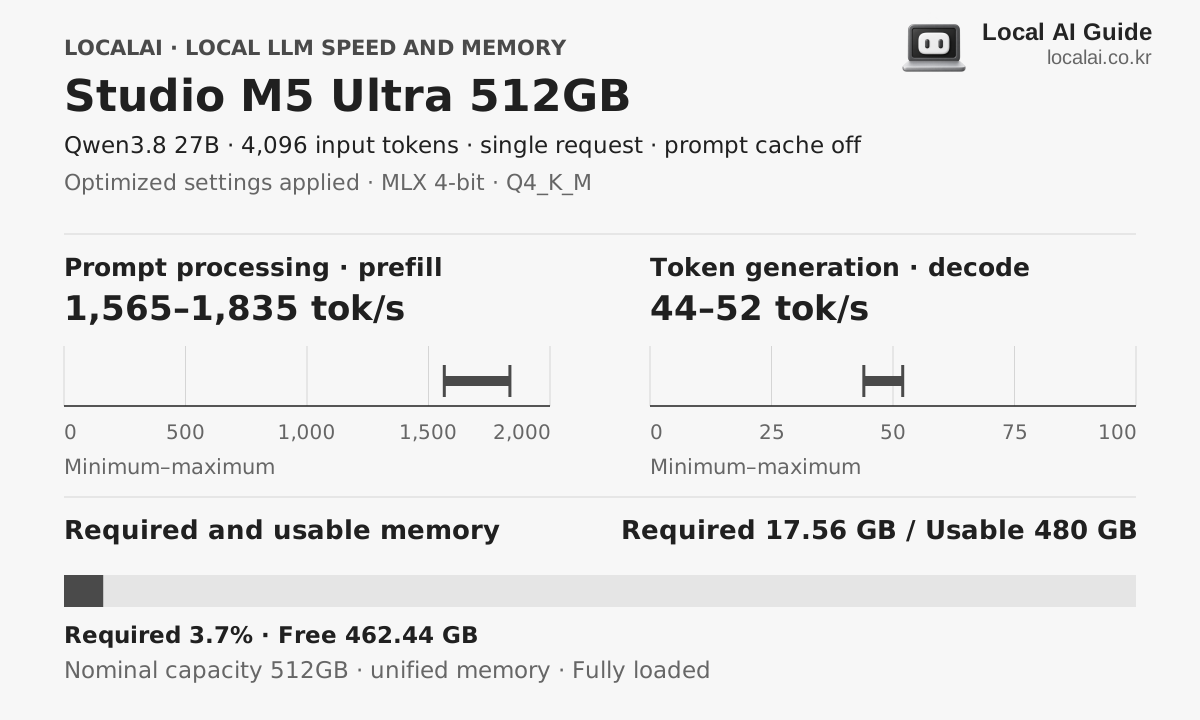
Hardware core specifications
- Available memory
- 480GB
- Memory bandwidth
- 1200GB/s
- Estimated sustained LLM load
- About 330W
- Korean price range (KRW)
- 3,805 × KRW 10,000–3,890 × KRW 10,000
Who it fits
- Model files and prompt caches that will not fit in 256GB
- Long contexts and multiple simultaneous workloads
- Large unified-memory capacity in one Mac
Skip it if
512GB costs ₩19.55 million more than 256GB. If the same model already fits comfortably in 256GB, that money does not make generation faster. If your budget is fixed, start from 256GB or 128GB. CUDA-only tools and extensions stay out of reach no matter how much unified memory you add.
Recommended format for each device 4K input
The model you will experience with this equipment
K2 Horizon 0.9B
Required 1.03GB · spare time
MLX 4-bit
Decode
1630.2 ~ 1811.3 tok/s
First token
0.30 to 0.55 seconds
Qwen3.8-Flash-Next
recommendedRequired 155GB · spare time
oMLX 0.7.0 (4d4f5a28) · mlx-lm 94cdcae · mlx 0.32.2 · native kernels · Lightning MTP on
Decode
103.5 ~ 184.1 tok/s
First token
0.65 to 1.2 seconds
GLM-5.3-Flash (MoE)
Required 190.51GB · spare time
oMLX 0.7.0 (4d4f5a28) · mlx-lm 94cdcae · mlx 0.32.2 · native kernels · Lightning MTP on
Decode
46.1 ~ 81.9 tok/s
First token
1.4 to 2.5 seconds
Actual speed varies with runtime version, cooling, context length and quantization file.
purchase judgment
What tasks is it suitable for?
Loading very large models
ConditionalParameter count alone does not decide whether a model fits. The actual converted file size plus the KV cache and runtime overhead has to fit within 512GB.
Long documents and simultaneous workloads
SuitableThe memory left after loading a model can go to a long input cache or parallel requests. Measure single-request token generation speed and multi-request throughput separately.
Models that already fit in 256GB
Not recommendedIf your work already runs on 256GB, moving to 512GB does not double generation speed. Start by calculating the capacity you need.
- The first thing to get stuck
- 512GB is the total of the unified memory. macOS, open apps, model weights and the KV cache all share this space. The 480GB shown here is headroom used for the calculation, not a figure Apple guarantees. If the same model fits comfortably in 256GB, 512GB does not raise generation speed in proportion.
- Configuration to check
- M5 Ultra · 36-core CPU · 80-core GPU · 512GB unified memory · 1TB SSD ₩38,050,000 (2TB ₩38,900,000)
- Criteria for spending more money
- Published runs used about 155GB for Flash-Next oQ4e and about 179GB for oQ5e, so both work on 256GB. Choosing 512GB becomes clear mainly when you need 6- or 8-bit without SSD offload, or several large models and long caches resident at once. With a 1TB SSD, 512GB is ₩38.05 million and 256GB is ₩18.5 million, so judge whether ₩19.55 million is worth that workload.
Frequently asked questions
- How much is the M5 Ultra 512GB?
- The 512GB configuration can be ordered from October 28, 2026, at ₩38.05 million with a 1TB SSD. That is ₩19.55 million more than the 256GB configuration at ₩18.5 million.
- Is the M5 Ultra 512GB twice as fast as the 256GB configuration?
- No. It uses the same 36-core CPU, 80-core GPU and 1.2TB/s memory bandwidth, so what changes with 512GB is how much you can keep loaded. The difference is only noticeable in work that offloads on 256GB.
- Which local LLM can be run on the Studio M5 Ultra 512GB?
- K2 Horizon 0.9B, Qwen3.8-Flash-Next, GLM-5.3-Flash (MoE) and others with a 4K input and the recommended format. Required memory varies by model and context length.
- What is the local LLM power of the Studio M5 Ultra 512GB?
- Sustained load is about 330 W, with an actual range of 240–460 W.
- Are the displayed token speeds ground truth?
- This is a range aligned to collected benchmark measurements under the same conditions. Combinations without a matching measurement are estimated from the nearest result and vary with runtime, cooling, quantization file and context length.
Equipment to compare together
Same chip, half the memory
Studio M5 Ultra 256GB
In a public measurement using Flash-Next 4-bit with MTP, a 4K input was processed at about 2,600–2,900 tok/s and a 512-token answer landed in the 90–112 tok/s range. Prefill held near 2,500 tok/s even at a 256K input. Beyond the larger unified memory, the shorter wait for a first answer on long prompts is the biggest difference from M3 Ultra.
When 128GB is enough
Studio M4 Max 128GB
Suits people who want to compare a wide range from 70B-class to high-precision models in a single finished machine.
When CUDA tools are essential
DGX Spark 128GB
This is for handling a large model on one machine without splitting it across several graphics cards. You should have a reason to buy 128GB. If the model you need now fits in 24GB or 32GB, do not assume Spark will be faster just because it has more memory.