
RTX 5090 32GB First check whether the task that ran out of room in 24GB fits in 32GB.
Compare this card if you repeatedly generate images or run 27B–35B inference and want shorter waits. But 32GB is still a limit. Buying on compute performance alone, without checking the model, input and image resolution, may leave you offloading again.
Speed and memory for the same model
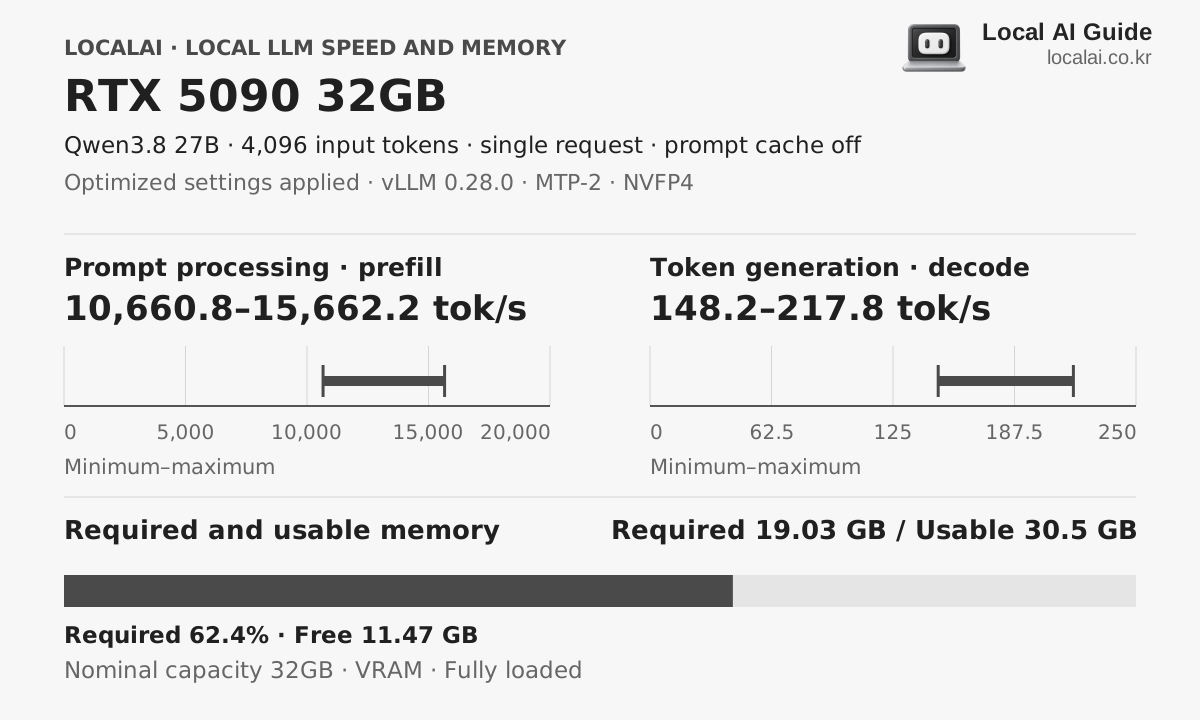
Hardware core specifications
- Available memory
- 30.5GB
- Memory bandwidth
- 1792GB/s
- Estimated sustained LLM load
- About 620W
- Korean price range (KRW)
- 899 × KRW 10,000–929 × KRW 10,000
Who it fits
- Repeated 27B–35B Q4 runs
- Image and video tasks that fit in 32GB
- Tools with confirmed Blackwell support
Skip it if
Do not replace the card before checking Blackwell support in the tools you use. The driver, PyTorch, and runtime versions need to work together. Length, thickness, and power requirements also vary by manufacturer's model, so check your existing case and PSU separately.
Recommended format for each device 4K input
The model you will experience with this equipment
K2 Horizon 0.9B
Required 1.03GB · spare time
llama.cpp CUDA · Q4_K_M
Decode
2637.3 ~ 2907.8 tok/s
First token
0.12 to 0.18 seconds
Qwen3.6 35B-A3B (MoE)
recommendedRequired 21.28GB · spare time
llama.cpp CUDA · Q4_K_M
Decode
111.5 ~ 280 tok/s
First token
0.47 to 0.73 seconds
Qwen3.8-Flash-Next
Required 82.5GB · tight
Strata 0.1.41 · IQ3_S · MTP-6 · INT8 KV · SSD PLE
Decode
127.7 ~ 263.9 tok/s
First token
0.46 to 0.94 seconds
Actual speed varies with runtime version, cooling, context length and quantization file.
purchase judgment
What tasks is it suitable for?
27B·35B conversation
SuitableFirst compare a Q4 setup with the model and input cache on the GPU. Acceleration options matter only when the particular model and runtime support them.
Image/video
ConditionalOne image and a long video have different memory demands. Choose the model, resolution and frame count, then check whether the configuration stays within 32GB.
24 hour server
ConditionalCalculate separately for a mostly idle server and one that generates continuously. Using only load power to estimate the monthly bill misses the actual usage pattern.
- The first thing to get stuck
- Moving a model and cache that exceed 32GB into RAM changes the conditions of the task. A video model's name alone is not enough either. Compare at the same resolution, frame count and offloading settings.
- Configuration to check
- RTX 5090 32GB card only · 64GB system RAM in this comparison · check the board vendor's PSU, connector and clearance requirements
- Criteria for spending more money
- If your current 24GB card finishes the work you need and the wait is acceptable, there is no rush to replace it. Once the time saved on repeated tasks and the need for 32GB are clear, include the cost of other PC parts before deciding.
On sales pages, look at memory before chips.
The model and speed assumptions above change if the product is not the 32GB configuration.
Frequently asked questions
- What LLM can be run on an RTX 5090 with 32GB?
- K2 Horizon 0.9B, Qwen3.6 35B-A3B (MoE), Qwen3.8-Flash-Next and others with a 4K input and the recommended format. Required memory varies by model and context length.
- What is the power consumption of a local LLM on an RTX 5090 with 32GB?
- Sustained load is about 620 W, with an actual range of 480–760 W.
- Are the displayed token speeds ground truth?
- This is a range aligned to collected benchmark measurements under the same conditions. Combinations without a matching measurement are estimated from the nearest result and vary with runtime, cooling, quantization file and context length.
Equipment to compare together
If your work fits in 24GB
RTX 4090 24GB
This is the machine to look at if you want to quickly process LLM and image creation that fit in 24GB and avoid the new high price.
CUDA models that need more than 32GB
DGX Spark 128GB
This is for handling a large model on one machine without splitting it across several graphics cards. You should have a reason to buy 128GB. If the model you need now fits in 24GB or 32GB, do not assume Spark will be faster just because it has more memory.
A complete system for work without CUDA
Mac mini M4 Pro 48GB
When you repeatedly read documents and edit code with a 27B model, each wait matters as well as capacity. This page uses the 20-core GPU, 48GB configuration. Distinguish it from less expensive listings with a 16-core GPU.