
memory and model
Last updated
How much VRAM or unified memory does a local LLM need?
Estimate local LLM headroom with VRAM and unified memory
When a local LLM1 runs, its software loads the model into computer memory to calculate an answer. On a PC with a discrete graphics card, the GPU2's VRAM3 is used for model computation; on an Apple Silicon Mac, the CPU4 and GPU share unified memory5. This guide explains how to check whether enough headroom remains to continue a conversation with your usual inputs after loading the model.
Besides the model file, the runtime6 uses workspace for computation, and the KV cache7 that stores conversation state grows as long inputs and follow-up questions are processed. We will look at memory layouts on PC and Mac, then use a long-document summary to reason about capacity and speed.
Summarize a document and ask follow-up questions with the same model, checking both where memory runs short and how quickly answers arrive.
On a PC, VRAM and system RAM are separate
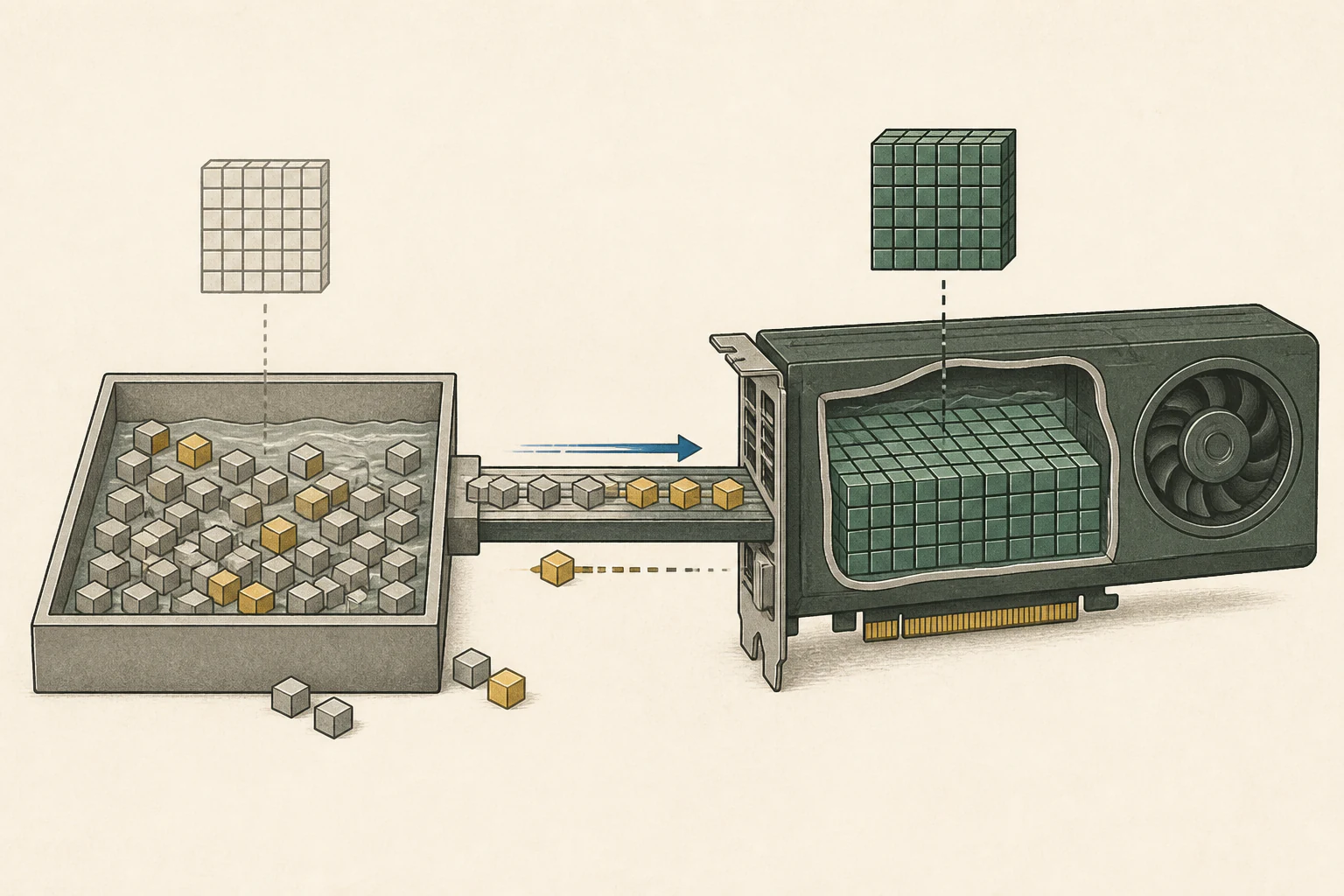
A PC with a discrete graphics card has separate VRAM and system RAM8. Model weights and workspace used by the GPU reside in GPU memory, while the operating system, browser, and document apps mainly use system RAM. NVIDIA's CUDA9 documentation also distinguishes GPU device memory from host memory used by the CPU.
More system RAM gives space to the operating system, apps and model portions placed on the CPU. GPU-resident portions must fit the card’s VRAM. An app with CPU/RAM offloading10 can divide a model that exceeds VRAM.
On Mac, CPU and GPU share memory
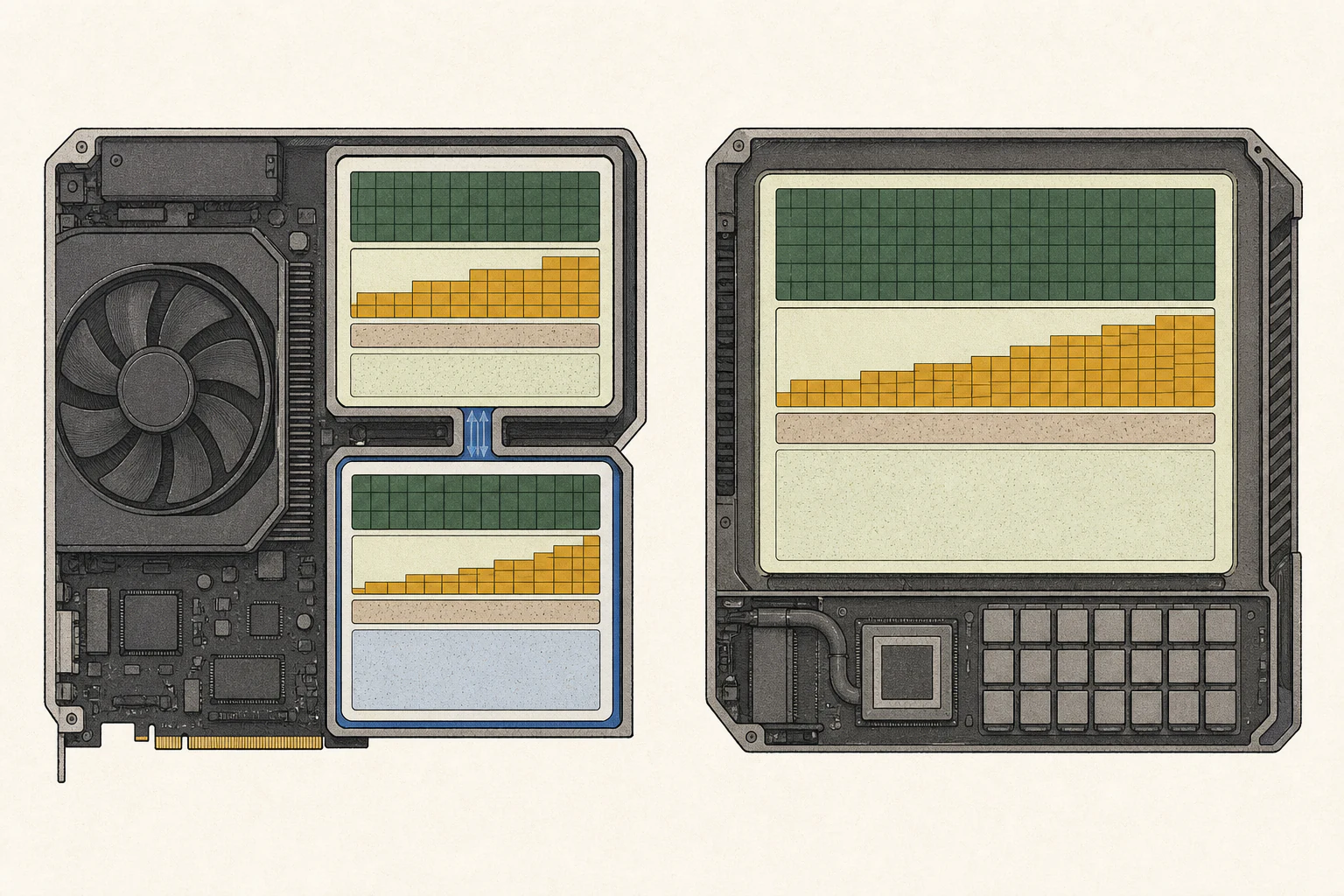
The CPU and GPU in an Apple Silicon Mac share the same physical memory, a layout called unified memory. Instead of adding VRAM and system RAM as on a PC, consider the unified-memory amount listed for the Mac as one pool. Apple's Metal11 documentation describes how the CPU and GPU share system memory.
On a 32GB Mac, the model and computation share the space left after macOS, browser and document apps. Load the model with your usual apps open and ask follow-up questions. Memory pressure and app responsiveness show whether your daily use has enough headroom.
Scroll sideways to compare all columns.
| Setup | Memory for GPU | Memory mainly used by CPU and apps | What to check |
|---|---|---|---|
| Discrete-GPU PC | Graphics-card VRAM | System RAM | Check VRAM and RAM separately. |
| Apple Silicon Mac | Unified memory shared by CPU and GPU | The same unified memory | Leave room for the OS and apps. |
Account for workspace beyond the model file
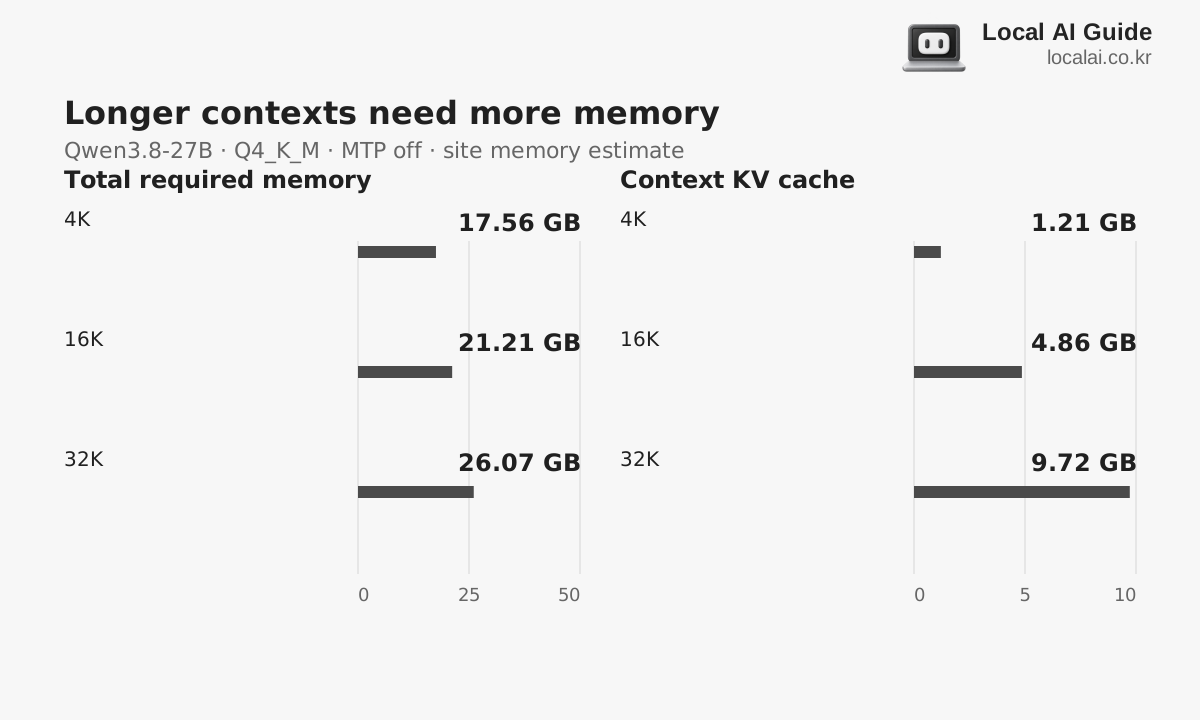
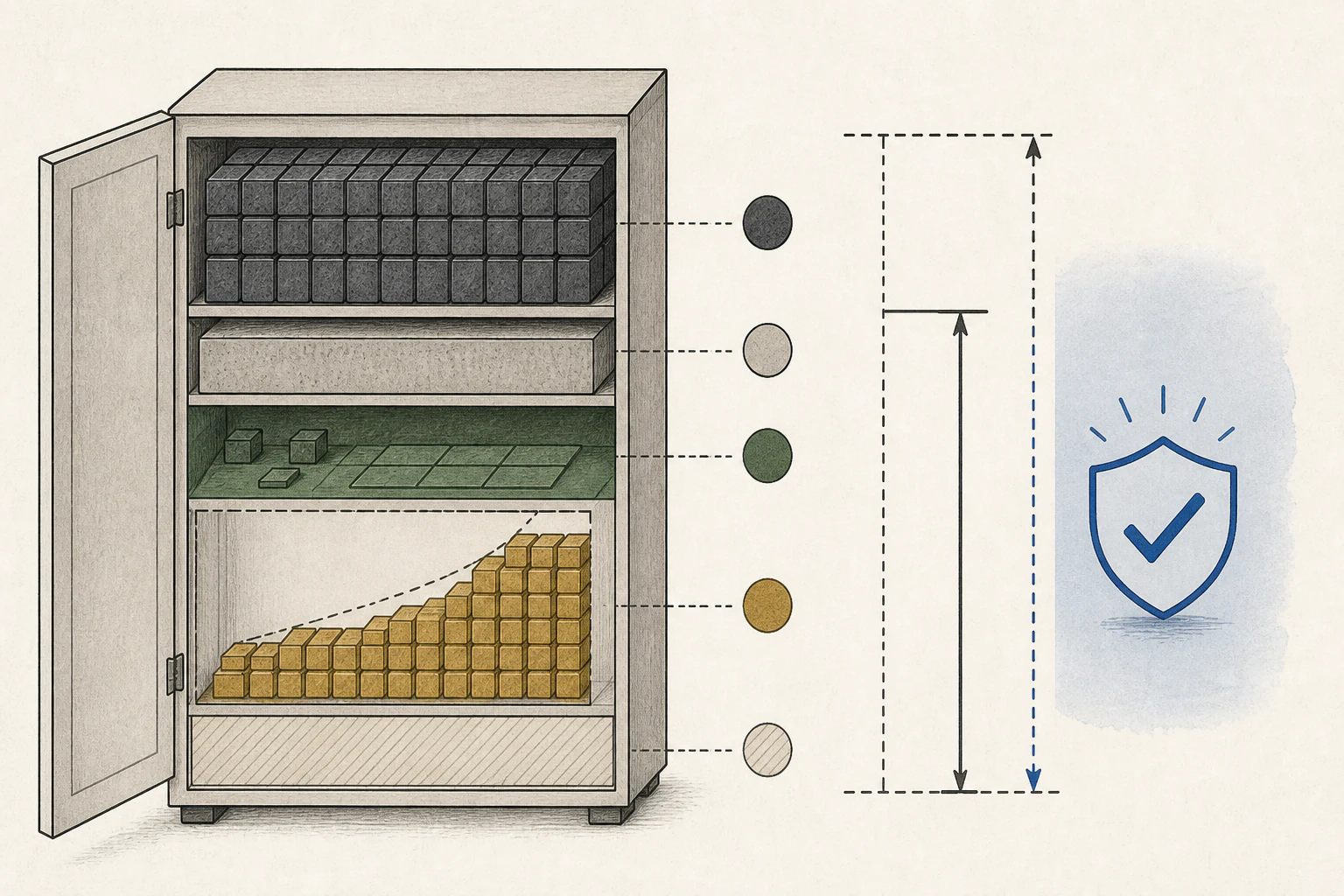
The model file stores weights used to produce answers. The runtime uses temporary workspace to load weights, read input, and generate output. Follow-up questions about a long document also require a KV cache to hold conversation state. Capacity planning therefore includes workspace and conversation state in addition to weights.
For illustration, suppose a 20 GB model file is run on 24 GB of VRAM; arithmetic leaves 4 GB. The runtime workspace and KV cache must share that space. Actual memory use varies with file format and runtime, so treat this as a rough budget and check usage after loading the model in your app.
| Aspect | Calculation | Next check |
|---|---|---|
| GPU VRAM | 24GB | Total dedicated memory |
| Model file | −20GB | Reference for weight storage |
| Arithmetic remainder | =4GB | Shared by runtime workspace and KV cache. |
| Actual run | Check under actual conditions | Test through long inputs and follow-ups. |
Memory capacity and bandwidth answer different questions
Capacity tells you whether there is room for the model and its computation state. Bandwidth describes how quickly data moves between the GPU and memory. Even with enough capacity, slow data delivery can stall computation; high bandwidth cannot help if the model does not fit. First find a configuration with enough capacity for the task, then compare bandwidth and compute performance within that set.
If the model handles long inputs and follow-ups without memory pressure but responses are slow, compare performance metrics rather than adding more memory. If memory runs short during input or you must close other apps, capacity headroom comes first.
Try RAM offloading when VRAM is insufficient
Some runtimes can keep some model layers in GPU VRAM and compute the rest from system RAM. This offloading method can run a model that does not fit entirely in VRAM. CPU computation and data transfers between memory pools may slow answers, so check completion time as well as whether the model loads.
Find the setting for GPU layer count or memory allocation in the runtime. Change one setting at a time, then use the same model and long document to complete a summary and follow-up question and compare completion time. Moving more layers to the GPU can reduce work from RAM, but loading can fail if VRAM is insufficient. Setting names and support vary by app, so consult its help.
Split a model across two GPUs
Two 24GB cards have 48GB in total. With model splitting enabled, the runtime places weights and working space on each card. Transfers between cards also take time, so compare first-answer and completion times with a single-card setup after loading.
The llama.cpp server documentation describes the number of model layers to place on GPUs and multi-GPU split modes. Splitting one model is different from handling separate requests on each GPU. First check whether your app supports that runtime and its sharding options.
Test memory with your usual workload before buying
Check the model and quantized-file sizes in the model explorer and confirm that your runtime supports the file. Note VRAM and system RAM separately on a PC, and unified memory on a Mac. Leave room for the operating system and apps you usually keep open. Quantization12 stores weights in fewer bits to reduce file size and runtime memory.
Enter a document you normally process, summarize it, and then ask a follow-up. On Windows, check dedicated memory in Task Manager's GPU section; on Mac, review memory pressure and app use in Activity Monitor's Memory tab. Apple's guide explains that memory pressure reflects available memory and swap among other factors. Note where memory runs short or apps slow down to see whether the current configuration is sufficient.
If your usual input completes and speed is acceptable, start with the current capacity. If long inputs run short, try quantization or supported offloading; if work still stops often, compare higher-memory configurations. If tasks complete but answers are slow, examine bandwidth or compute performance. Compare estimated speeds with the calculator, then verify again with your app and inputs before buying.
Terminology notes
Large language model — A model trained on large text datasets to learn language patterns and process or generate text in context.
Back to the textGPU — A processor designed to handle many calculations in parallel. It performs model computations during AI inference.
Back to the textVRAM — Memory used by a graphics card’s GPU to store model weights and intermediate values.
Back to the textCPU — The central processor that runs the operating system and general-purpose instructions; in AI workloads it also handles tasks such as preprocessing and data movement.
Back to the textUnified memory — An architecture where the CPU and GPU share one physical memory pool.
Back to the textRuntime — The software environment that provides facilities needed while a program runs. In local AI, it can also refer to a model execution engine.
Back to the textKV cache — Memory that stores attention keys and values from earlier tokens for reuse during later token generation. Its size depends on context length and batch size.
Back to the textSystem RAM — System memory that temporarily holds data while programs run.
Back to the textCUDA — A software platform for general-purpose computing on NVIDIA GPUs.
Back to the textOffloading — Moving some model data from GPU memory to system RAM or storage when capacity is limited. This adds data transfer.
Back to the textMetal — Apple’s low-level technology for graphics and parallel GPU computation.
Back to the textQuantization — A way to represent model weights or values with fewer bits, reducing storage and memory use. The coarser representation can also affect accuracy.
Back to the text
Frequently asked questions
- What should you check first in this article?
- When a local LLM runs, its software loads the model into computer memory to calculate an answer. On a PC with a discrete graphics card, the GPU's VRAM is used for model computation; on an Apple Silicon Mac, the CPU and GPU share unified memory. This guide explains how to check whether enough headroom remains to continue a conversation with your usual inputs after loading the model.
- How much memory does it need?
- On a 32GB Mac, the model and computation share the space left after macOS, browser and document apps. Load the model with your usual apps open and ask follow-up questions. Memory pressure and app responsiveness show whether your daily use has enough headroom.