
Response speed and acceleration
Last updated
What is Lightning MTP? Faster answers with oMLX 0.7.1rc1
Lightning MTP verifies candidate tokens together to reduce sequential generation steps.
Lightning MTP1 is a generation path in oMLX for Apple Silicon that uses an MTP head in supported models to propose next-token candidates, then includes the consecutive candidates confirmed by the main model in the answer. Check that the checkpoint2 retains MTP weights, then compare first-token, generation, and completion times and answer quality with the same input used for standard generation.
When asking about a PDF, first distinguish a long wait before the first text appears from slow generation after the answer begins. Lightning MTP primarily targets the latter stage. Check document processing and initial model loading separately.
MTP prepares next-token candidates while an answer is being generated
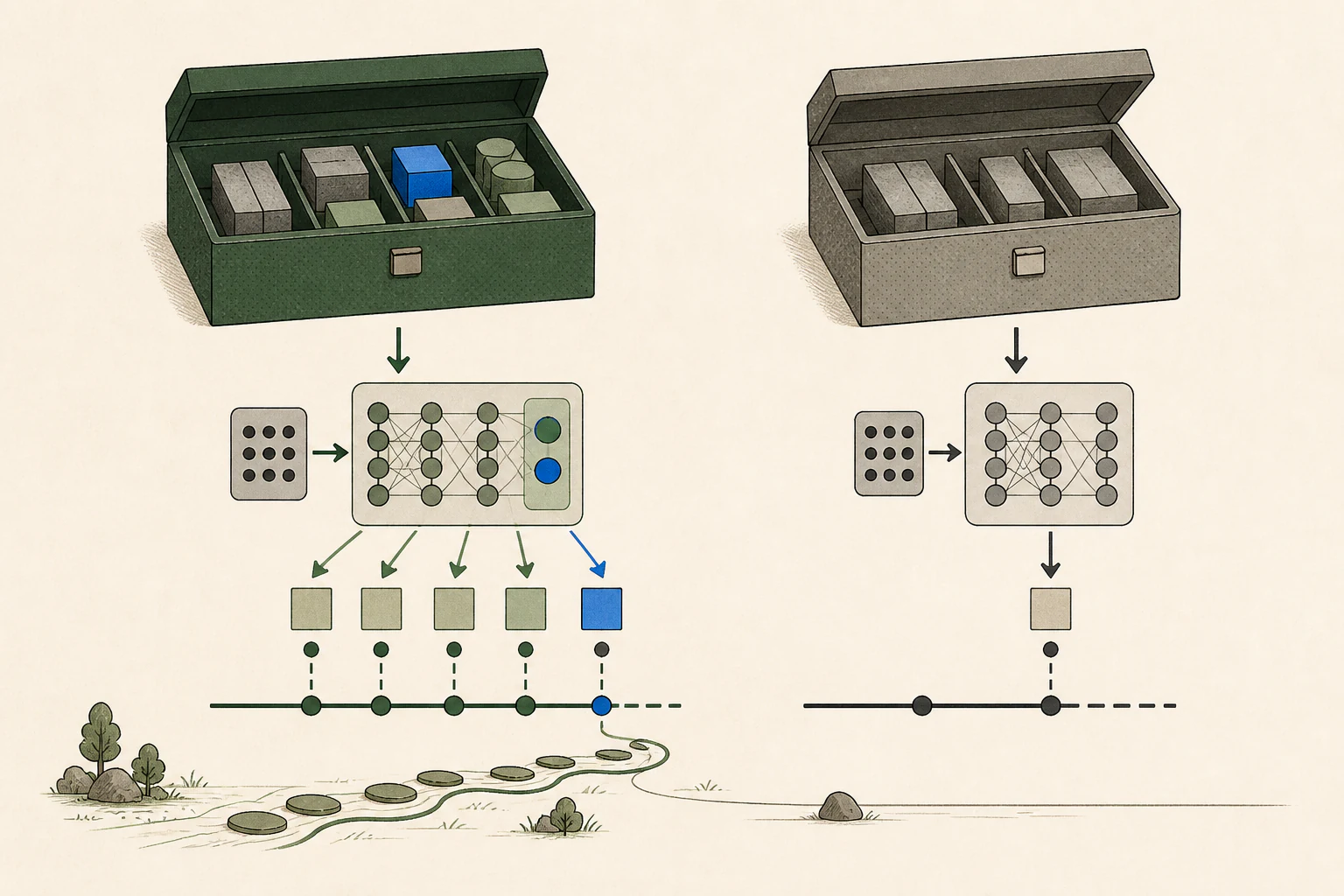
When an app that asks questions about PDFs connects to the oMLX API3, oMLX runs the model and returns an answer. In standard generation, the model selects one next token4, adds it to the context, and calculates the next token again. Multi-Token Prediction (MTP) uses an auxiliary prediction head trained with the model to propose several next-token candidates, which the main model checks in one pass. The main model includes consecutive candidates it confirms in the answer, discards candidates from the first mismatch onward, and continues with standard generation.
Proposing and checking candidates also requires computation. Models and requests that often accept proposed tokens can reduce sequential calculations, while a lower acceptance rate can reduce the savings. Compare total completion time and the answer for the same question instead of judging by draft depth alone.

Prepare a checkpoint that retains MTP weights
To choose a supported combination, check the version and architecture in the oMLX release model list. Review the file format in the checkpoint instructions and confirm that the converted file retains MTP-head tensors. Then check whether the model settings show an MTP option for that checkpoint.
For an initial comparison, keep a file that returns a normal answer with standard generation as your baseline, then add one supported MTP checkpoint. If the model does not load, check the file path, memory, and checkpoint format before changing MTP settings. If both standard and MTP versions of the same model are available, check for MTP tensors as well as file size.
The 0.7.1.dev1 result is a file-editing test on M3 Ultra
The table gathers the file-editing scope and completion results reported in the development release published on October 9, 2026. It measures time to finish a request, so to see how it applies to your work, compare with matched model and input conditions as described below.
| Model families | Task and conditions | Release report |
|---|---|---|
| Qwen · Gemma 4 · GLM-5.3 · MiMo | File editing · temperature 1.0 · M3 Ultra | Completion 1.5 to 2 times faster than standard generation |
To apply the result to your work, match the model and checkpoint, input, output length, and temperature. After a warm-up, alternate the same file-edit request between standard generation and MTP. Record total completion time and whether the resulting code meets the requirement. For PDF questions or short chats, test that workload directly instead of using file-edit results.
Generation gains with TurboQuant at longer contexts
The 0.7.1rc1 release also improves the combination of a TurboQuant 4-bit KV cache5 and Lightning MTP. Qwen3.8-27B on M3 Ultra generated faster after 16K and 32K inputs. If you already use this model, this gives you a specific long-context configuration to compare.
| Input length | Before | After |
|---|---|---|
| 16K | 39.9 tok/s | 68.8 tok/s |
| 32K | 39.0 tok/s | 66.2 tok/s |
M3 Ultra · Qwen3.8-27B · TurboQuant 4-bit KV + Lightning MTP · maintainer measurements against the code immediately preceding each change · repetitions and full sampling settings are not specified in the release table
At 16K, the measured gain was about 29 generated tokens per second. For your own work, reuse one document and fix the response length, then measure time to first token6 and full completion separately. TurboQuant changes KV-cache representation while Lightning MTP changes candidate generation, so record both settings.
Compare from first token through answer review with the same input
If you test MTP with the PDF question introduced at the beginning, use the same file, page, and question. That workload differs from the file-editing results in the previous section, so measure a task you actually do. Time from document loading to the first token includes prefill7 and request wait; the rate of subsequent tokens shows generation. Also record total time through the final sentence. MTP changes the generation path, so track input-reading and initial model-loading time separately.
Run a warm-up for standard generation and MTP, then alternate three trials each and compare the medians to reduce the effect of brief background activity. Keep input-token count, answer length, temperature, KV-cache setting, and number of concurrent requests the same. Check that the answer preserves the evidence in the question. For a server handling several requests, measure one request and concurrent requests separately to see how load changes the results.
If generation remains slow with MTP enabled, inspect the selected Lightning MTP path, draft depth and acceptance behavior in the logs. If it falls back to ordinary generation, check the architecture and cache combination. If Lightning MTP runs with low acceptance, compare draft depth and checkpoints one at a time on the same request.

Check KV cache and batching conditions too
The KV cache retains computed information about processed tokens for subsequent generation. Reuse of common input across separate requests depends on the server’s prefix-cache settings. When comparing MTP, record fresh conversations and follow-ups on the same document separately, matching input lengths and request order.
Concurrent requests change engine batching and memory use. To evaluate MTP on a server, first record a normal response and throughput8 baseline with one request. Then reproduce the actual concurrent-request pattern and compare errors and total throughput with the same inputs. Run this measurement with the model and checkpoint you use.
If MTP is consistently faster and answer quality holds, use that checkpoint with the corresponding oMLX version. If you change models often or the converted file lacks an MTP head, use standard generation as your baseline. Check the actual runtime9 path in the server log, and record before-and-after time and answer accuracy for the same request.
Terminology notes
MTP — A training objective or model component for predicting multiple future tokens at once. In speculative decoding, those predictions can be proposed as candidate tokens.
Back to the textCheckpoint — A file containing saved model weights and related state. Versions or tasks in one model family may use different checkpoints.
Back to the textAPI — A defined interface that lets other code call a program’s functions.
Back to the textToken — A unit into which a model divides input or output for processing.
Back to the textKV cache — Memory that stores attention keys and values from earlier tokens for reuse during later token generation. Its size depends on context length and batch size.
Back to the textTime to First Token — The time from sending a request until its first output token arrives.
Back to the textPrefill — The stage where an LLM reads the input prompt and computes representations for its tokens. Longer prompts contain more tokens to process.
Back to the textThroughput — The amount of work processed or generated over time. Comparisons need the unit, such as tokens per second or requests per second.
Back to the textRuntime — The software environment that provides facilities needed while a program runs. In local AI, it can also refer to a model execution engine.
Back to the text
Frequently asked questions
- What should you check first in this article?
- Lightning MTP is a generation path in oMLX for Apple Silicon that uses an MTP head in supported models to propose next-token candidates, then includes the consecutive candidates confirmed by the main model in the answer. Check that the checkpoint retains MTP weights, then compare first-token, generation, and completion times and answer quality with the same input used for standard generation.
- How much memory does it need?
- If you test MTP with the PDF question introduced at the beginning, use the same file, page, and question. That workload differs from the file-editing results in the previous section, so measure a task you actually do. Time from document loading to the first token includes prefill and request wait; the rate of subsequent tokens shows generation. Also record total time through the final sentence. MTP changes the generation path, so track input-reading and initial model-loading time separately.