
Purchases and Costs
Last updated
Mac mini 24GB or 32GB: is more memory worth it for local AI?
Choose 24 GB or 32 GB for working headroom, not speed alone
A Mac mini's unified memory1 is shared by model weights, KV cache2, working space, the operating system, and open apps. If 24 GB handles short chats and editing selected passages, more memory is not essential. Choose 32 GB when memory pressure interrupts work with long documents and several apps, and the larger configuration resolves that issue.
Suppose you revise selected passages in a proposal PDF while keeping a browser and editor open. Asking a local model for help is only part of the workflow; the other apps also use memory. A demo that handles one short question does not show whether 24 GB fits your normal work.
The model and your usual apps share memory
A Mac's unified memory holds more than model weights: it also needs KV cache for conversation context and temporary space for computation. The operating system, browser, and document editor use the same memory, so the model download's file size alone does not tell you how much remains.
Suppose the weights use 12GB, cache and workspace 3GB, and the system and apps 6GB. The total is 21GB. Under this illustrative assumption, 24GB leaves 3GB arithmetically and 32GB leaves 11GB. That margin is available for longer documents and follow-up questions. Check actual needs with your model, usual apps and inputs.
| Setup | Assumed use | Arithmetic margin |
|---|---|---|
| 24GB | 21GB | 3GB |
| 32GB | 21GB | 11GB |
- Context length, RoPE and sliding-window attention
- GGUF vs MLX: which model format should you download?
- LLM memory bandwidth vs compute: how to find the speed bottleneck
- How much VRAM or unified memory does a local LLM need?
- Orca Connect: attach your own GPU to Claude Code
- Mac mini M6 vs M4: which 24GB or 32GB setup should you buy for local AI?

Some workflows fit comfortably in 24 GB
If you send selected proposal passages to the model, revise the wording, and can browse and edit while waiting, you may have no memory problem to solve on 24 GB. Check that this workflow completes with short inputs and your usual apps open.
If a summary gets amounts or conditions wrong, inspect the text sent to the model first. Check whether PDF tables were extracted and relevant exceptions were included. If the same mistakes persist with correct input, try a larger model or higher precision, then calculate memory for that candidate.
The parameter count in “8B model” alone cannot determine whether 24 GB is enough. Quantization3 file, runtime4, and context length5 also affect memory. If selected-passage editing works and you do not plan to process entire long documents, 24 GB may be a suitable choice.
32 GB adds headroom for long inputs and several apps
Comparing requirements near the beginning of a proposal with estimates later in the document, then asking follow-up questions, can increase both input size and conversation state. If the model runs alone but you need to close other apps after adding the document, check whether the same task and app mix works smoothly in 32 GB; that is the practical value of the extra memory.
The goal is not the number 8 GB itself but headroom that may reduce closing and reopening the browser or unloading and reloading a model. If you alternate between two models, check whether they need to remain resident together, and include each model's KV cache and runtime space as well as weights. A 32 GB option alone does not guarantee both models can run simultaneously.
If the workload exceeds the usable capacity of 32 GB, the mid-tier option may leave the same constraint. First check whether a smaller quantized file produces adequate answers or whether you can provide only the needed passages. If memory is sufficient but answer generation is slow, adding memory to the same chip does not increase compute performance or bandwidth in the same proportion.
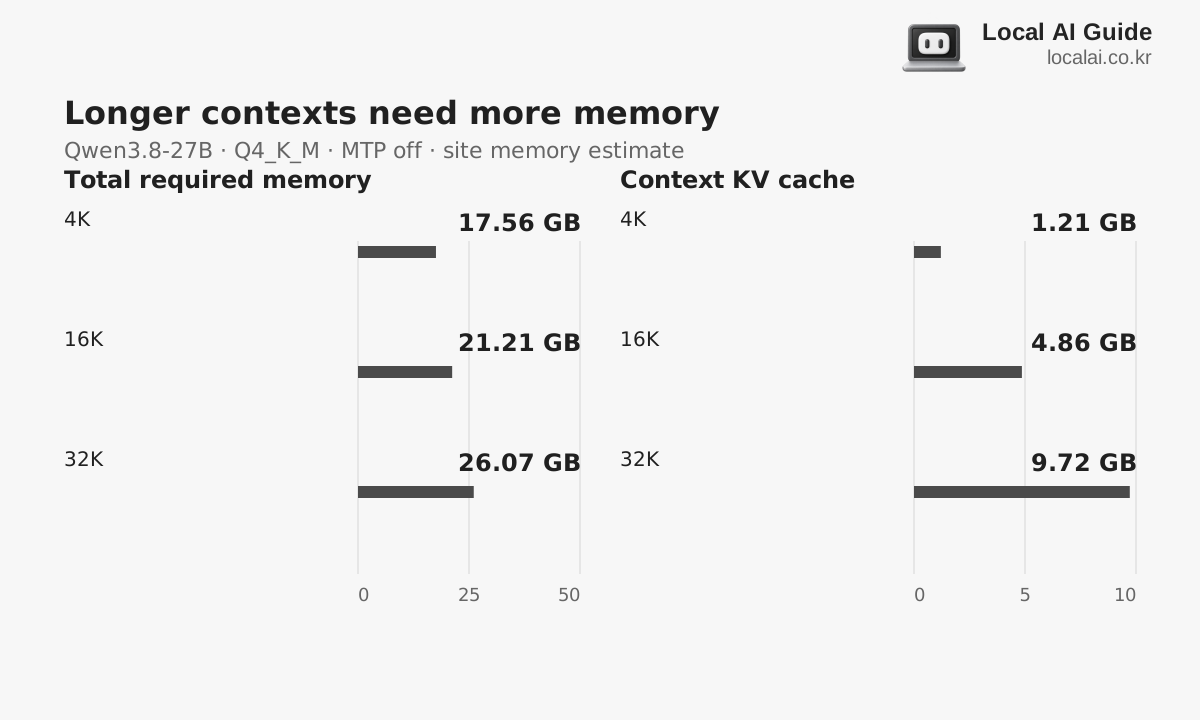

Check memory use alongside memory pressure
On your current Mac, record memory with your usual apps open, after loading the model, and while generating an answer from the proposal. Keep the document length and model filename too, so you can compare with other settings.
In Activity Monitor’s Memory tab, examine memory pressure, swap and app responsiveness together. If higher pressure repeatedly coincides with stalled window switching or model reloads, headroom is insufficient. If apps and answers remain smooth despite a high usage graph, continue the current work. Record document length and concurrent apps to compare purchase candidates.
If an error occurs as the model starts, check the runtime's allocation request and context limit. A particular allocation can fail even when some physical memory appears free, so read the error message separately from the usage graph and change one setting at a time.
Separate today's option cost from possible future costs
The added price to choose 32 GB today rather than 24 GB differs from the cost of replacing the whole computer later if memory proves insufficient. Future resale proceeds are uncertain, so calculate the amount you pay now separately from possible recovery later.
If editing proposal passages and searching for references work well on the current configuration, choosing 24 GB leaves budget for other needs. If long inputs force you to close apps and evidence shows the same task runs smoothly in 32 GB, the added memory pays to reduce recurring friction. If the model is too demanding for either configuration, 32 GB alone does not resolve the decision.
Before checkout, confirm the chip, unified memory, and SSD6 capacity match the configuration you compared. Do not mistake a larger SSD for more memory or count a different chip's price premium as a memory cost. Choose for the work you do now—reading, editing, and saving proposals—rather than vague future-proofing.
| Usual work | Start with |
|---|---|
| Model, documents and apps run smoothly in 24GB | Keep 24GB and retain the extra budget |
| You must close apps for every long document | Check whether the same work runs smoothly in 32GB |
| Memory remains but generation is slow | Compare runtimes, acceleration and chip performance |
Terminology notes
Unified memory — An architecture where the CPU and GPU share one physical memory pool.
Back to the textKV cache — Memory that stores attention keys and values from earlier tokens for reuse during later token generation. Its size depends on context length and batch size.
Back to the textQuantization — A way to represent model weights or values with fewer bits, reducing storage and memory use. The coarser representation can also affect accuracy.
Back to the textRuntime — The software environment that provides facilities needed while a program runs. In local AI, it can also refer to a model execution engine.
Back to the textContext window — The token span of input and generated content a model can handle in one request. The supported limit and memory use depend on the model and runtime settings.
Back to the textSSD — A data storage device that uses flash memory and retains data without power.
Back to the text
Frequently asked questions
- What should you check first in this article?
- A Mac mini's unified memory is shared by model weights, KV cache, working space, the operating system, and open apps. If 24 GB handles short chats and editing selected passages, more memory is not essential. Choose 32 GB when memory pressure interrupts work with long documents and several apps, and the larger configuration resolves that issue.
- How much memory does it need?
- A Mac's unified memory holds more than model weights: it also needs KV cache for conversation context and temporary space for computation. The operating system, browser, and document editor use the same memory, so the model download's file size alone does not tell you how much remains.